The First Prediction Market Terminal Built for Human–Agent Collaboration
Yes, Another Prediction Markets Terminal, We Know
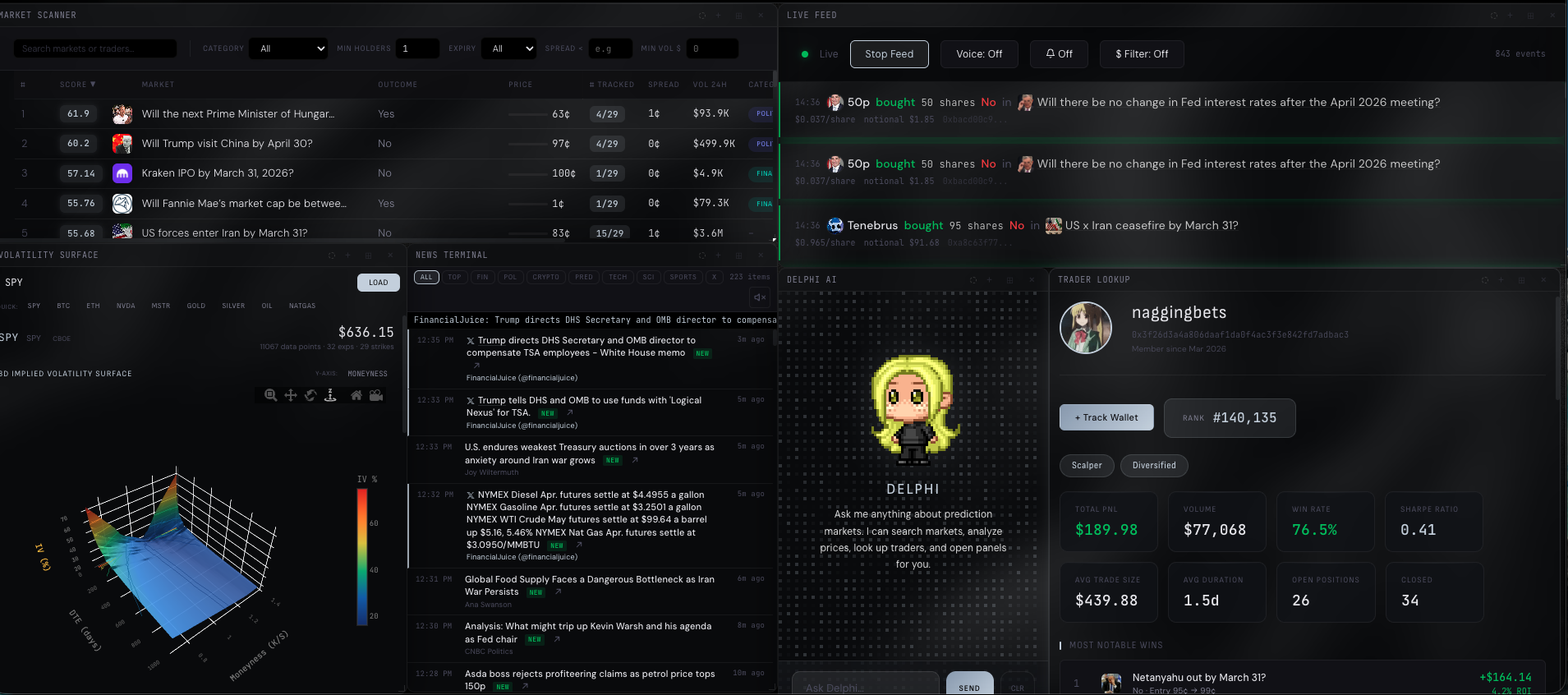
We listened to the community and built what they actually asked for — a single terminal connecting Polymarket, Kalshi, and hundreds of data sources. Our terminal comes equipped with lightning-fast execution, an AI agent that understands your portfolio, and a keyboard-first interface designed to keep you in flow.
Deep Market Scanner
Analyze liquidity depth, identify abnormal vol-spikes, and get real-time alerts on wallet activity from your tracked traders. Spot mispriced contracts before the crowd.
Instant Execution
Place orders across Polymarket and Kalshi from one interface. No tab switching, no lag, no confirmation dialogs. Pick your side, set your price, and fire.
Built for Every Vertical
Sports sharps, election traders, OSINT experts, TradFi analysts. Purpose-built tooling for each vertical, not a generic dashboard that half-works for everyone.
Your Layout, Your Rules
Custom layouts, persistent workspaces, and fully remappable hotkeys. Dock the panels you care about, hide the rest, and save everything per strategy.

Every Source You Could Possibly Need. All In One Place.
Prediction markets, financial feeds, news, and intelligence — unified in one place and delivered to you or your AI agent in real time.





















The Most Agile Terminal You Can Use Without a Mouse
Press / to open the command bar. Type a code, hit enter, and spawn any panel instantly. Every hotkey is fully remappable.
Select a market with MS, then drill into subcommands: order book, time & sales, flow analysis, Monte Carlo, and more.
Some features are still in development.
Market Select Subcommands
After selecting a market via MS, drill deeper with:
Plug In Any AI Agent
Connect OpenClaw, Claude Code, or any AI agent directly into the terminal. Let them prompt for data, run analysis, and act on results. Or talk to Delphi, our in-house agent, via the /DELPHI command.

Meet Delphi, our in-house AI agent. Call her with /DELPHI from the command bar like any other command. She can answer questions, pull data, and open tools for you. Or let your external agents talk to her directly.
One API. Every Data Source. Zero Complexity.
You don't need to be a developer. One API key gets you prediction markets, AI analysis, real-time news, trader intelligence, and more. If you can copy-paste a string of text, you can use the Metis API.
Market Data
Polymarket, Kalshi, and more. Order books, price history, whale positions, and volume analytics in one call.
AI Analysis
Ask Delphi anything through the API. Research markets, run simulations, or generate trade ideas — no prompt engineering needed.
Trader Intel
Look up any wallet. Positions, win rate, P&L, and history. Track the best traders and mirror their moves.
News & Signals
Hundreds of sources with AI-scored relevance. Sports injuries, earnings, geopolitical signals — all the context in one feed.
Live Streaming
WebSocket channels for real-time prices, order books, trade feeds, and wallet activity. Subscribe to what matters.
Full Terminal Control
Drive the terminal from code. Place orders, run scanners, trigger tools. Build bots that use the same interface you do.
Frequently Asked Questions
Everything you need to know about the terminal
A professional-grade desktop terminal purpose-built for prediction market traders. It pulls real-time data from Polymarket, Kalshi, CME, and hundreds of other sources into one keyboard-driven interface with advanced analytics, AI-powered analysis via Delphi, and sub-12ms execution.
Polymarket and Kalshi for prediction markets, CME Group and Deribit for derivatives, ESPN and major sports feeds for injury data, Reuters and hundreds of aggregated news sources, plus weather APIs and earnings calendars. All data flows into one unified interface — no more tab-switching between platforms.
Delphi is Metis Terminal's built-in AI agent. Type /DELPHI in the command bar and ask anything in plain English — search markets, analyze order books, look up wallet positions, run Monte Carlo simulations, or export data. She has full access to every data source in the terminal and responds in seconds.
Metis supports a full agent protocol. Give your OpenClaw agent (or Claude Code, or any custom agent) your Metis API key and it can connect to Delphi automatically. Your agent can query markets, pull analytics, and act on results through the same interface that powers Delphi — it's literally a one-message setup.
No. The API is designed for everyone — if you can copy-paste a URL, you can use it. One API key gets you 30+ endpoints covering market data, AI analysis, trader intelligence, news feeds, and real-time WebSocket streams. The simplest use case: give your AI agent the API key and let it handle everything.
Yes. Press / to open the command bar, type a short code like MS (Market Select) or TTG (Trading Terminal), and hit enter. Every hotkey is fully remappable, layouts are saved per strategy, and you can dock, hide, or resize any panel. No mouse required.
Metis Terminal is currently in closed beta. Join the waitlist above and we'll reach out as spots open. Early access users help shape the product — your feedback directly influences what gets built next.